Guide to Multi-Turn Dialogue Evaluation
Introduction to Multi-Turn Dialogue
Multi-turn dialogue refers to an interactive conversation format between users and the service backend involving multiple exchanges. Unlike single-turn dialogue (where a user asks one question and the system provides one answer), multi-turn dialogue consists of multiple rounds, with each round relying on the content of previous conversations. This dialogue format more closely resembles natural human communication.
Introduction to Evaluation Capabilities
Currently, service-based performance evaluation for multi-turn dialogue data is supported. The compatibility of different service backends and datasets is as follows:
Supported Service Backends
✅ vLLM
✅ MindIE Service
✅ SGLang
Supported Datasets
✅ ShareGPT
✅ MTBench
Quick Start
Usage Notes
⚠️ For the SGLang service backend, you need to change the client in the API configuration file to
OpenAIChatStreamSglangClient.📚 The number of rounds is counted as the actual number of requests (e.g., 2 dialogue groups with 7 total rounds will result in performance metrics for 7 requests in the evaluation results).
Command Explanation
Take the performance evaluation scenario of ShareGPT multi-turn dialogue on the vLLM service v1/chat interface stream infer backend as an example:
ais_bench --models vllm_api_stream_chat --datasets sharegpt_gen --debug -m perf
Where:
--models: Specifies the model task, i.e., thevllm_api_stream_chatmodel task.--datasets: Specifies the dataset task, i.e., thesharegpt_gendataset task.
Preparations Before Running the Command
1. For --models
To use the vllm_api_stream_chat model task, you need to prepare an inference service that supports the /v1/chat/completions sub-service. Refer to 🔗 Start an OpenAI-Compatible Server with vLLM to launch the inference service.
2. For --datasets
To use the sharegpt_gen dataset task, you need to prepare the ShareGPT dataset by following the instructions in 🔗 ShareGPT Dataset.
Modifying Configuration Files for Corresponding Tasks
Each model task, dataset task, and result presentation task corresponds to a configuration file. These files must be modified before running the command. To find the paths of these configuration files, add --search to the original AISBench command. For example:
# Note: Adding "--mode perf" to the search command does not affect the search results
ais_bench --models vllm_api_stream_chat --datasets sharegpt_gen --mode perf --search
⚠️ Note: Executing the command with
--searchwill print the absolute paths of the configuration files corresponding to the tasks.
The query result will look like this:
06/28 11:52:25 - AISBench - INFO - Searching configs...
╒══════════════╤═══════════════════════════════════════╤════════════════════════════════════════════════════════════════════════════════════════════════════════════════════════════════╕
│ Task Type    │ Task Name                             │ Config File Path                                                                                                               │
╞══════════════╪═══════════════════════════════════════╪════════════════════════════════════════════════════════════════════════════════════════════════════════════════════════════════╡
│ --models     │ vllm_api_stream_chat        │ /your_workspace/benchmark/ais_bench/benchmark/configs/models/vllm_api/vllm_api_stream_chat.py                        │
├──────────────┼───────────────────────────────────────┼────────────────────────────────────────────────────────────────────────────────────────────────────────────────────────────────┤
│ --datasets   │ sharegpt_gen                          │ /your_workspace/benchmark/ais_bench/benchmark/configs/datasets/sharegpt/sharegpt_gen.py                                        │
╘══════════════╧═══════════════════════════════════════╧════════════════════════════════════════════════════════════════════════════════════════════════════════════════════════════════╛
Key Notes on Configuration Files
The dataset task configuration file
sharegpt_gen.pyin this quick start requires no additional modifications. For an introduction to dataset task configuration files, refer to 📚 Open-Source Datasets.The model configuration file
vllm_api_stream_chat.pycontains settings related to model operation and must be modified according to your actual environment. Critical fields to modify are annotated in the code below:
from ais_bench.benchmark.models import VLLMCustomAPIChat
from ais_bench.benchmark.utils.postprocess.model_postprocessors import extract_non_reasoning_content
models = [
    dict(
        attr="service",
        type=VLLMCustomAPIChat,
        abbr='vllm-api-chat-stream',
        path="",                       # Specify the absolute path to the model's serialized vocabulary file (usually the model weight folder path)
        model="",                      # Specify the name of the model loaded on the server (configure based on the actual model pulled by the vLLM inference service)
        stream=True,                   # stream infer mode
        request_rate=0,              # Request sending frequency: 1 request is sent to the server every 1/request_rate seconds. If < 0.1, all requests are sent at once.
        retry=2,
        api_key="",                    # Customize api_key, which is empty by default
        host_ip="localhost",         # Specify the IP address of the inference service
        host_port=8080,              # Specify the port of the inference service
        url="",                        # Customize url, which is empty by default
        max_out_len=512,             # Maximum number of tokens output by the inference service
        batch_size=1,                  # Maximum concurrency for sending requests
        trust_remote_code=False,
        generation_kwargs=dict(
            temperature=0.01,
            ignore_eos=False
        ),
        pred_postprocessor=dict(type=extract_non_reasoning_content),
    )
]
Executing the Command
After modifying the configuration files, run the following command to start the service-based performance evaluation (⚠️ It is recommended to add --debug for the first execution to print detailed logs, which helps troubleshoot errors during inference service requests):
# Add --debug to the command line
ais_bench --models vllm_api_stream_chat --datasets sharegpt_gen -m perf --debug
Viewing Performance Results
Example of Printed Performance Results
06/05 20:22:24 - AISBench - INFO - Performance Results of task: vllm-api-chat-stream/sharegptdataset:

╒══════════════════════════╤═════════╤══════════════════╤══════════════════╤══════════════════╤══════════════════╤══════════════════╤══════════════════╤══════════════════╤══════╕
│ Performance Parameters   │ Stage   │ Average          │ Min              │ Max              │ Median           │ P75              │ P90              │ P99              │  N   │
╞══════════════════════════╪═════════╪══════════════════╪══════════════════╪══════════════════╪══════════════════╪══════════════════╪══════════════════╪══════════════════╪══════╡
│ E2EL                     │ total   │ 2048.2945  ms    │ 1729.7498 ms     │ 3450.96 ms       │ 2491.8789 ms     │ 2750.85 ms       │ 3184.9186 ms     │ 3424.4354 ms     │ 8    │
├──────────────────────────┼─────────┼──────────────────┼──────────────────┼──────────────────┼──────────────────┼──────────────────┼──────────────────┼──────────────────┼──────┤
│ TTFT                     │ total   │ 50.332 ms        │ 50.6244 ms       │ 52.0585 ms       │ 50.3237 ms       │ 50.5872 ms       │ 50.7566 ms       │ 50.0551 ms        │ 8    │
├──────────────────────────┼─────────┼──────────────────┼──────────────────┼──────────────────┼──────────────────┼──────────────────┼──────────────────┼──────────────────┼──────┤
│ TPOT                     │ total   │ 10.6965 ms       │ 10.061 ms        │ 10.8805 ms       │ 10.7495 ms       │ 10.7818 ms       │ 10.808 ms        │ 10.8582 ms       │ 8    │
├──────────────────────────┼─────────┼──────────────────┼──────────────────┼──────────────────┼──────────────────┼──────────────────┼──────────────────┼──────────────────┼──────┤
│ ITL                      │ total   │ 10.6965 ms       │ 7.3583 ms        │ 13.7707 ms       │ 10.7513 ms       │ 10.8009 ms       │ 10.8358 ms       │ 10.9322 ms       │ 8    │
├──────────────────────────┼─────────┼──────────────────┼──────────────────┼──────────────────┼──────────────────┼──────────────────┼──────────────────┼──────────────────┼──────┤
│ InputTokens              │ total   │ 1512.5           │ 1481.0           │ 1566.0           │ 1511.5           │ 1520.25          │ 1536.6           │ 1563.06          │ 8    │
├──────────────────────────┼─────────┼──────────────────┼──────────────────┼──────────────────┼──────────────────┼──────────────────┼──────────────────┼──────────────────┼──────┤
│ OutputTokens             │ total   │ 287.375          │ 200.0            │ 407.0            │ 280.0            │ 322.75           │ 374.8            │ 403.78           │ 8    │
├──────────────────────────┼─────────┼──────────────────┼──────────────────┼──────────────────┼──────────────────┼──────────────────┼──────────────────┼──────────────────┼──────┤
│ OutputTokenThroughput    │ total   │ 115.9216 token/s │ 107.6555 token/s │ 116.5352 token/s │ 117.6448 token/s │ 118.2426 token/s │ 118.3765 token/s │ 118.6388 token/s │ 8    │
╘══════════════════════════╧═════════╧══════════════════╧══════════════════╧══════════════════╧══════════════════╧══════════════════╧══════════════════╧══════════════════╧══════╛
╒══════════════════════════╤═════════╤════════════════════╕
│ Common Metric            │ Stage   │ Value              │
╞══════════════════════════╪═════════╪════════════════════╡
│ Benchmark Duration       │ total   │ 19897.8505 ms      │
├──────────────────────────┼─────────┼────────────────────┤
│ Total Requests           │ total   │ 8                  │
├──────────────────────────┼─────────┼────────────────────┤
│ Failed Requests          │ total   │ 0                  │
├──────────────────────────┼─────────┼────────────────────┤
│ Success Requests         │ total   │ 8                  │
├──────────────────────────┼─────────┼────────────────────┤
│ Concurrency              │ total   │ 0.9972             │
├──────────────────────────┼─────────┼────────────────────┤
│ Max Concurrency          │ total   │ 1                  │
├──────────────────────────┼─────────┼────────────────────┤
│ Request Throughput       │ total   │ 0.4021 req/s       │
├──────────────────────────┼─────────┼────────────────────┤
│ Total Input Tokens       │ total   │ 12100              │
├──────────────────────────┼─────────┼────────────────────┤
│ Prefill Token Throughput │ total   │ 17014.3123 token/s │
├──────────────────────────┼─────────┼────────────────────┤
│ Total generated tokens   │ total   │ 2299               │
├──────────────────────────┼─────────┼────────────────────┤
│ Input Token Throughput   │ total   │ 608.7438 token/s   │
├──────────────────────────┼─────────┼────────────────────┤
│ Output Token Throughput  │ total   │ 115.7835 token/s   │
├──────────────────────────┼─────────┼────────────────────┤
│ Total Token Throughput   │ total   │ 723.5273 token/s   │
╘══════════════════════════╧═════════╧════════════════════╛
💡 For the meaning of specific performance parameters, refer to 📚 Explanation of Performance Evaluation Results.
Viewing Detailed Performance Data
After executing the AISBench command, detailed task execution data is saved to a default output path. The output path is indicated in the printed logs during runtime. For example:
06/28 15:13:26 - AISBench - INFO - Current exp folder: outputs/default/20250628_151326
This log indicates that detailed task data is stored in outputs/default/20250628_151326 (relative to the directory where the command was executed).
20250628_151326           # Unique directory generated for each experiment based on timestamp
├── configs               # Auto-saved dump of all configuration files
├── logs                  # Runtime logs (no log files are saved if --debug is added to the command, as logs are printed directly to the terminal)
│   └── performance/      # Logs from the inference phase
└── performance           # Performance evaluation results
     └── vllm-api-chat-stream/          # Name of the "service-based model configuration" (corresponds to the `abbr` parameter in the model task configuration file)
          ├── sharegptdataset.csv          # Per-request performance output (CSV), matching the "Performance Parameters" table in the printed results
          ├── sharegptdataset.json         # End-to-end performance output (JSON), matching the "Common Metric" table in the printed results
          ├── sharegptdataset_details.h5   # Full打点 ITL data (Inter-Token Latency)
          ├── sharegptdataset_details.json # Full detailed metrics
          └── sharegptdataset_plot.html    # Request concurrency visualization report (HTML)
💡 The sharegptdataset_plot.html report (a request concurrency visualization) is recommended to be opened in browsers such as Chrome or Edge. It shows the latency of each request and the number of concurrent service requests perceived by the client at each moment.
⚠️ Note: In multi-turn dialogue scenarios, the upper chart connects multiple requests in each dialogue group into a single line. Therefore, the vertical axis represents the index of multi-turn dialogue data groups (not concurrency).
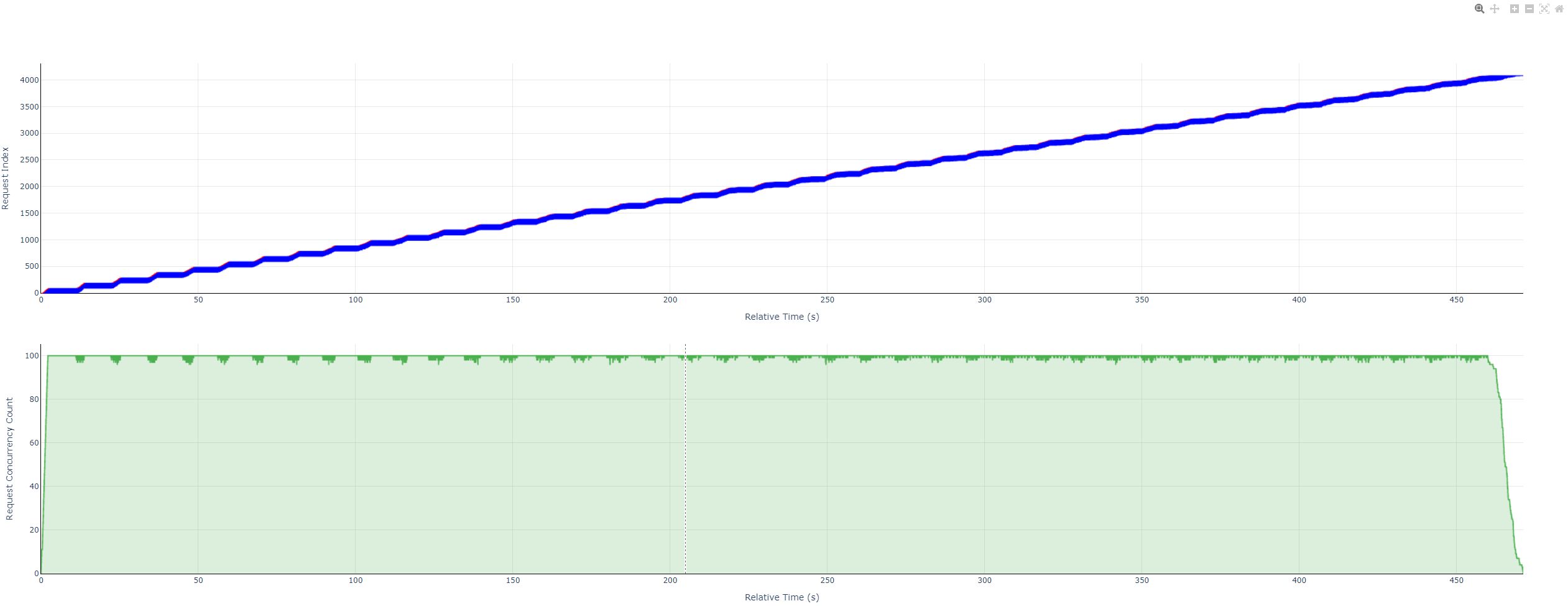
For instructions on how to view the charts in the specific HTML file, please refer to 📚 Guide to Using Performance Test Visualization Concurrent Charts